New

New: Stockaro is now on the Shopify App Store. Try the beta →
Available now

Simpler
warehouse work for
your Shopify store.

Stockaro helps Shopify merchants keep stock levels, receiving, picking and fulfillment in order — simple, practical and built around how Shopify stores actually work. For stores running on spreadsheets, stores with no WMS yet, and stores moving off another inventory tool.

Ready in minutesGDPR-compliantMade in Germany
app.stockaro.de/lager
Stockaro stock overview
Low Stock Alert — 3 SKUs
WZK-1180Tool case Pro, 180 pieces8 pcs
AKS-18V-4Cordless drill 18V (4Ah)3 pcs
KBI-300-100Cable ties 300mm (pack of 100)42 pcs
AKS-18V-4
Cordless drill 18V (4Ah) · Aisle A-04
14 days free
GDPR-compliant
Hosted in the EU
Shopify-native
Made in Germany

Warehouse reality

Sound familiar?

As order volume grows, spreadsheets and manual routines start to break down. Stockaro tidies up those processes.

Stock levels unclear
What is on the shelf no longer matches what Shopify shows. Corrections disappear into nowhere.
Receiving done by hand
New goods get noted on paper or in a spreadsheet — and then nobody transfers them.
Picking from paper slips
Pick lists get printed or shouted across the room. Packing errors are only a matter of time.
Stockouts spotted too late
Items sell out before anyone notices. Replenishment is always one step behind.
Too many tools
Shopify, spreadsheets, email and sticky notes — a bit of everything, none of it complete.
No overview
Which SKUs sell well? What is sitting still? Those questions usually go unanswered.

Stockaro solves exactly these problems — no lengthy setup, no IT project, no weeks of training.

How it works

The whole flow in under a minute

From unclear stock levels to a picked and packed order — in the Shopify admin and out in the warehouse on a phone or tablet.

With sound · 54 seconds · plays without a consent prompt, the video is hosted on our own server

What's said in the video

Does your warehouse look like this too? Your Shopify store runs. Your warehouse doesn't.

The orders come in — but the computer is two rooms away. And the stock in your store hasn't been right for a long time.

Stockaro — in the Shopify admin. And in the warehouse, on a phone or tablet. In the admin you see everything: what's open, what's running low, what ships today.

Scan, book, done. Your Shopify stock follows right away. The list keeps up while you walk through the warehouse.

Stockaro. Warehouse management you can actually use in the warehouse.

Feature overview

Everything a Shopify warehouse needs

No oversized software, no overengineering. Stockaro covers the core processes of small and mid-sized Shopify stores — from putaway to reporting.

Every core feature from the entry plan on. Higher plans scale with your order volume, not with locked features. Only the items marked Pro and up are reserved for Pro and Business.

Stock & locations

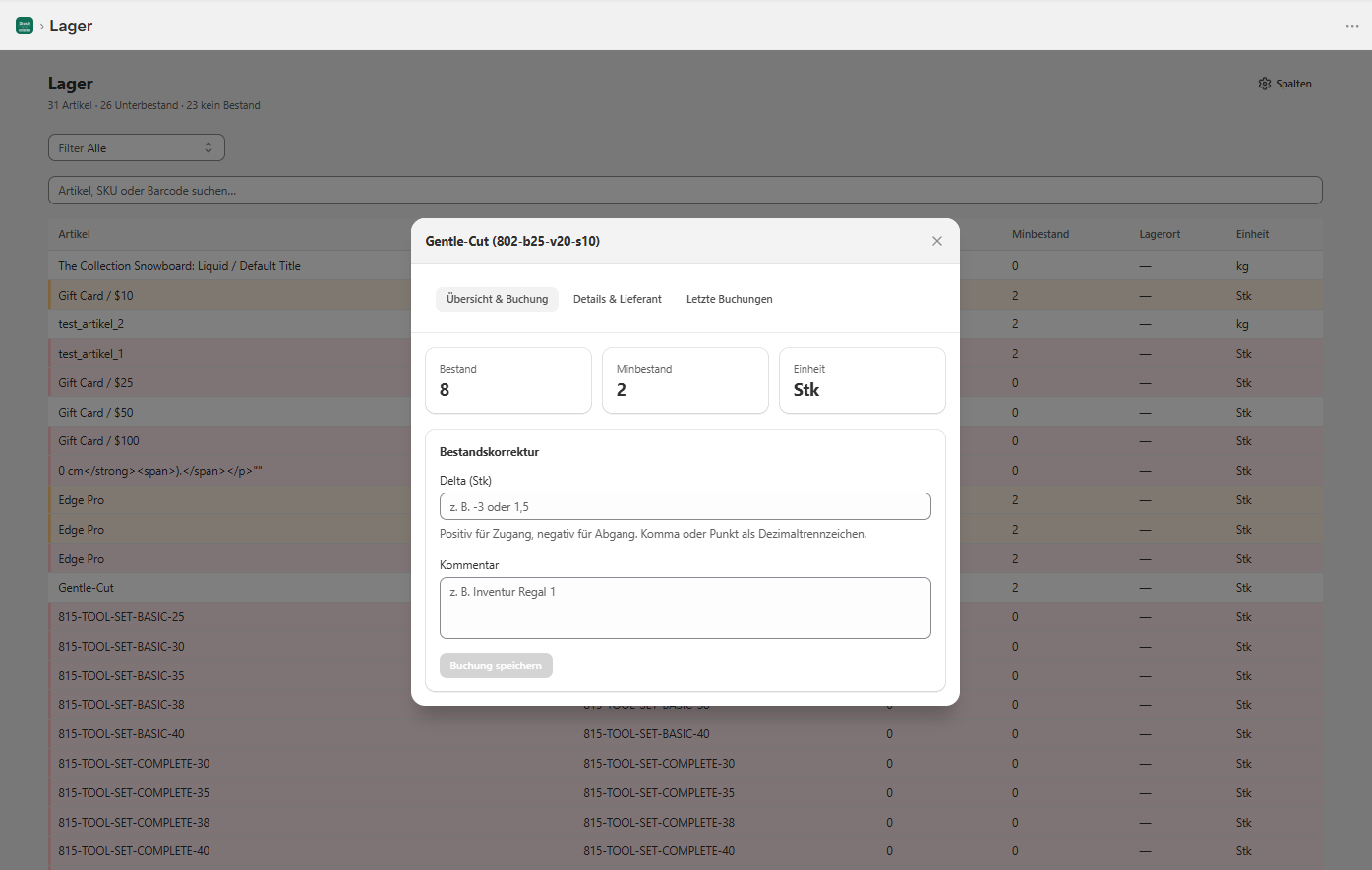
  • Item master with SKU, unit & barcode
  • Complete movement journal — every change traceable
  • Multiple bin locations & transfers
  • Location hierarchy (aisle / rack / bin)
  • Bundles & bills of materials

Receiving & purchasing

  • Suppliers with price, lead time & minimum order
  • Purchase orders with PDF & status
  • Receive by scan — against open POs or freely
  • Reorder suggestions Pro and up

Picking & fulfillment

  • Pick list by order or by item
  • Scan picking, sorted by location
  • Packing workflow & packing slip PDF
  • Fulfillment with tracking number back to Shopify

Stocktakes

  • Guided cycle counts
  • Quick count straight from your phone
  • Expected vs. counted, posted automatically

Labels & barcodes

  • Label printing in 4 designs, single & batch
  • Custom templates & Avery sheets Pro and up
  • Scan with a phone camera or a hardware scanner

Shopify sync & control

  • Stock posted automatically from paid orders
  • Returns are posted back in
  • Product approval for new variants
  • Stock reconciliation with drift detection

Reporting

  • Movement statistics & top SKUs
  • Stock history & inventory turnover Pro and up
  • Weekly report by email

Coming from spreadsheets or a legacy system? You can bring your existing items across to Stockaro by CSV.

Migration

Three steps to an orderly warehouse

Stockaro is quick to set up — whether you have been working with spreadsheets, another tool, or no system at all.

1

Install the app

Install Stockaro from the Shopify App Store. The connection is made automatically — no technical setup needed.

Takes under 5 minutes.
2

Import your stock

Import existing SKUs by CSV — common columns from spreadsheets or a legacy system (SKU, stock, minimum stock, supplier) are recognized automatically.

By CSV, webhook or by hand.
3

Run your warehouse

Watch stock levels, work through orders, assign locations — all in one interface, straight from Shopify.

Ready to use right away.

Features

What Stockaro does day to day
Manage stock levels
Current quantities at a glance. Stockaro posts outgoing stock automatically from Shopify orders.
Receive goods
Scan new goods in and post them immediately. No paper, no retyping into spreadsheets.
Pick orders
Open orders become a pick list. Scan the item, tick it off, done — nothing to print.
Catch stockouts early
Stockaro shows which items are running low well before your storefront runs empty.
Barcode & camera scanning
Scan in the browser — with a phone camera or an optional hardware scanner. Receiving, returns and transfers right where the goods are.
Packing & fulfillment
Packing slip in one click. A packing status per order, so nothing is done twice or forgotten.
app.stockaro.de/bestellungen
Stockaro orders
Fulfillment

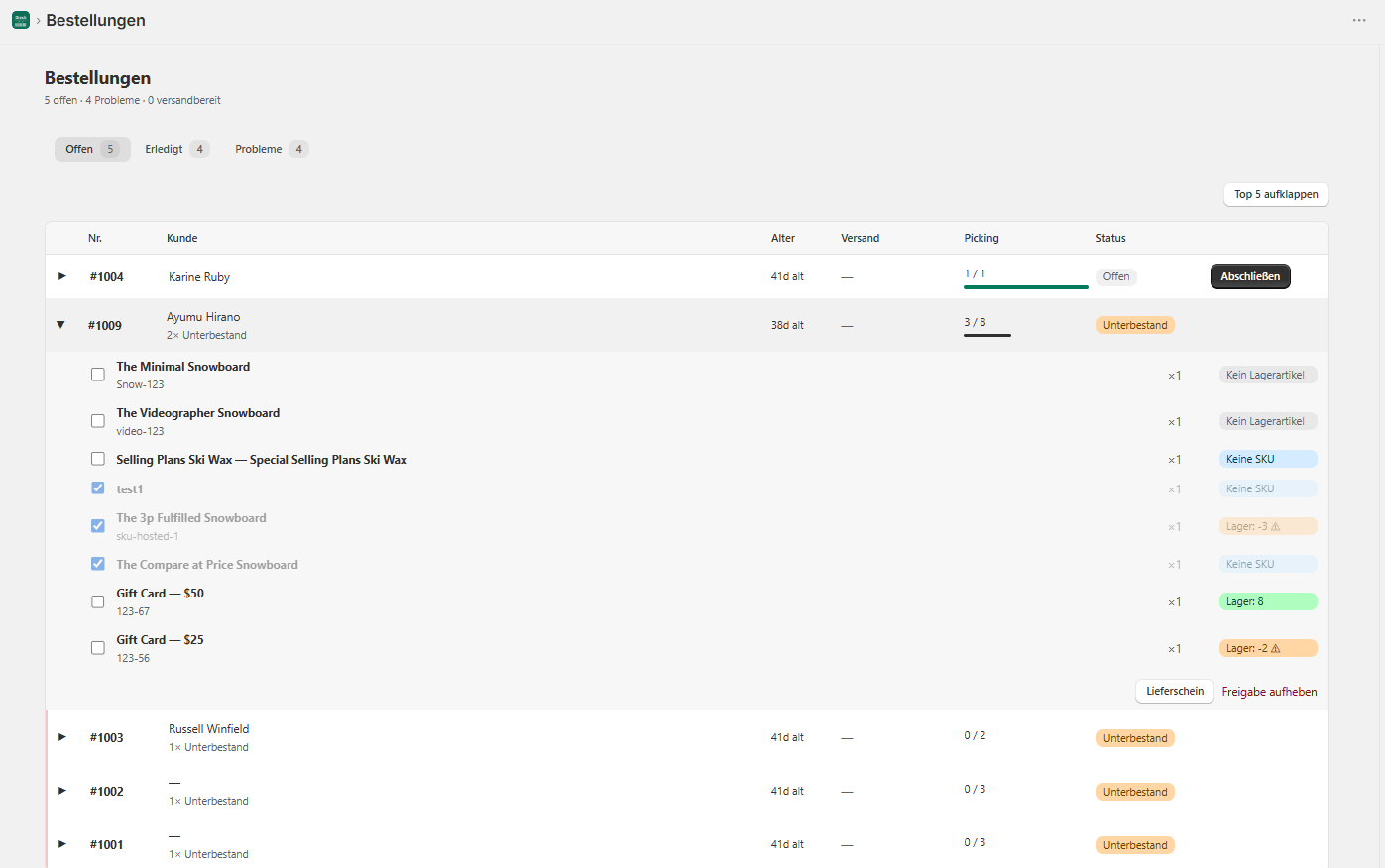
Pack and ship orders

Work through open orders where the goods are. Picking status, low-stock warnings and packing slips — all in one view, without switching to a Shopify tab.

  • Picking progress per order
  • Short stock and missing SKUs visible at once
  • Print a packing slip in one click
NEW

Product approval workflow

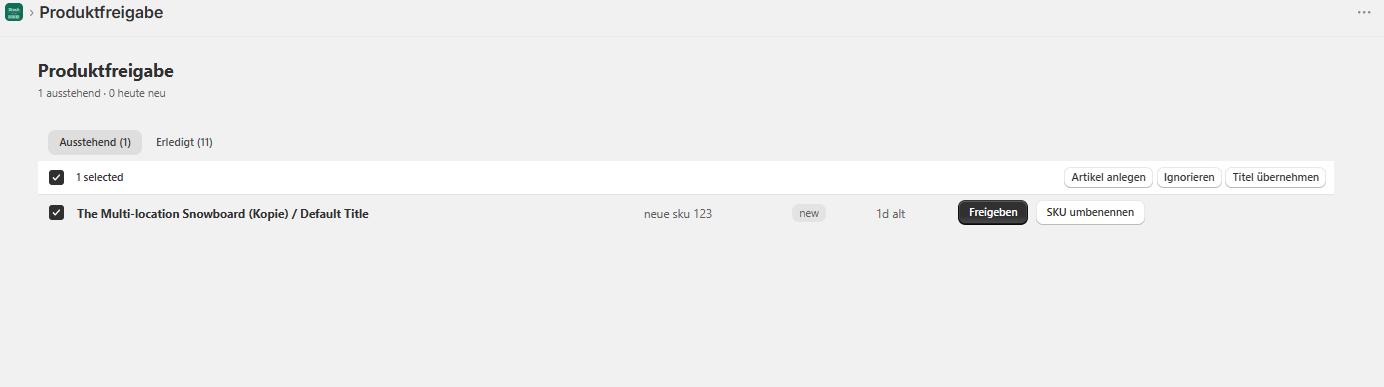
New products, SKU changes and new variants do not land in your item list automatically — they wait for a deliberate review. You stay in control of what the warehouse actually manages.

  • Review new Shopify products & variants
  • Assign, rename or ignore a SKU
  • Controlled, semi-automatic entry into the item list
app.stockaro.de/freigabe
Stockaro product approval

PO-2026-0183 · example flow

Draft
3 lines · 60 pcs
Ordered
PDF sent to supplier · Jul 28
Partial delivery
40 received · 20 open
Delivered
Remainder expected Aug 9
Purchasing · in every plan

Purchasing & receiving

Order replenishment straight from the warehouse: suppliers with terms, purchase orders as PDF, receiving by scan — including against open POs. On the higher plans Stockaro suggests what to reorder.

  • Supplier records with price, lead time & minimum order
  • Purchase orders with status & PDF
  • Scan goods in — against a PO or freely
  • Reorder suggestions from min/max levels (Pro and up)

TSH-NAVY-M · 3 bin locations

Aisle · Rack · Bin
A · 03 · 07Primary42
A · 04 · 0218
B · 01 · 116
Transfer — every movement posted
Shopify sees66
Warehouse structure

Multiple bin locations, clearly sorted

Shopify only counts how much you have. Stockaro knows where it is: assign stock to individual bins, transfer between them (properly posted) and have the pick list follow your location hierarchy — shorter walks at the rack.

  • Several bin locations per item
  • Transfers between bins — every movement posted
  • Aisle / rack / level / bin hierarchy
  • Pick list sorted by walking route

Mobile app

Scan at the rack,
steer from the desk

Stockaro runs entirely in the browser — on a phone and on a desktop. No app store, no installation, no update cycles.

Mobile · step 01

Scan instead of type

Your phone camera becomes the barcode scanner — SKU recognized, quantity chosen, stock posted in or out. No retyping into spreadsheets.

Mobile · step 02

Pick without searching

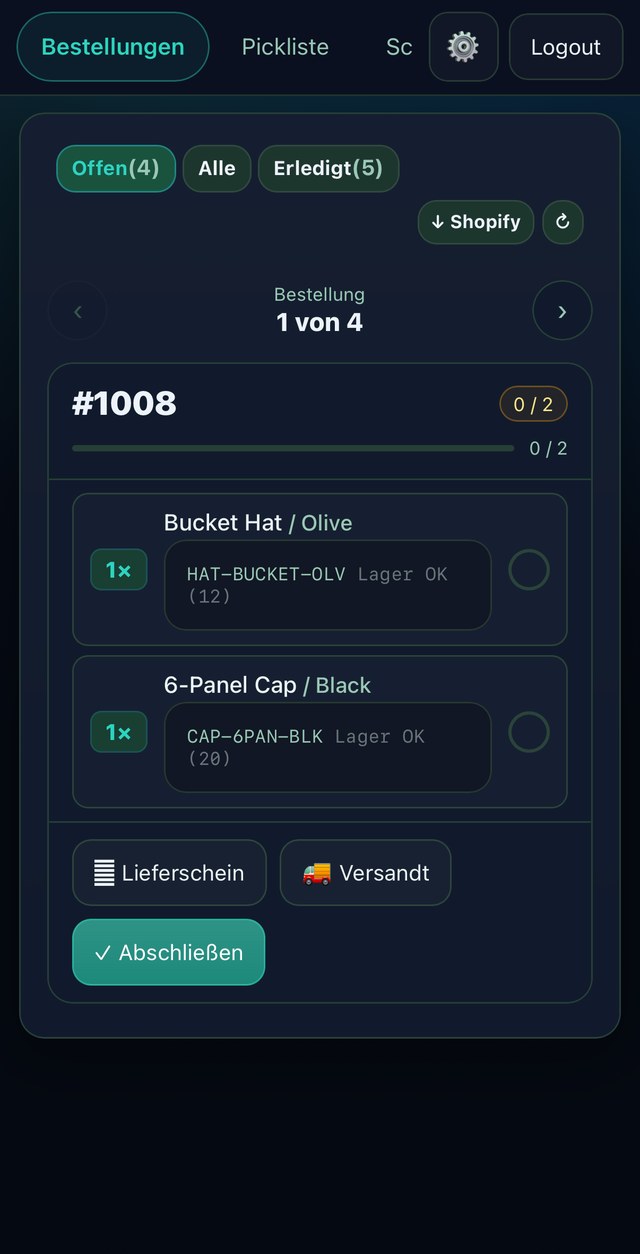
Open orders as one collected list — sorted by order or by item, ticked off line by line at the rack.

Mobile · step 03

Every order under control

Packing slip and fulfillment straight from the phone — live packing status per order, always the same stock as on the desktop.
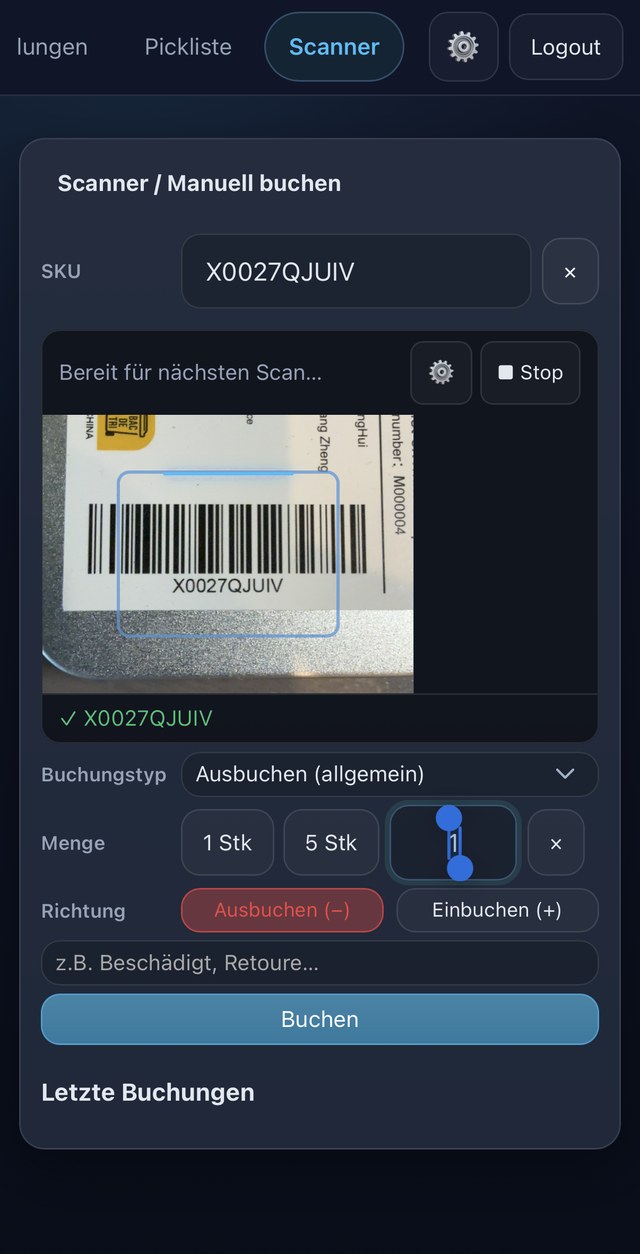
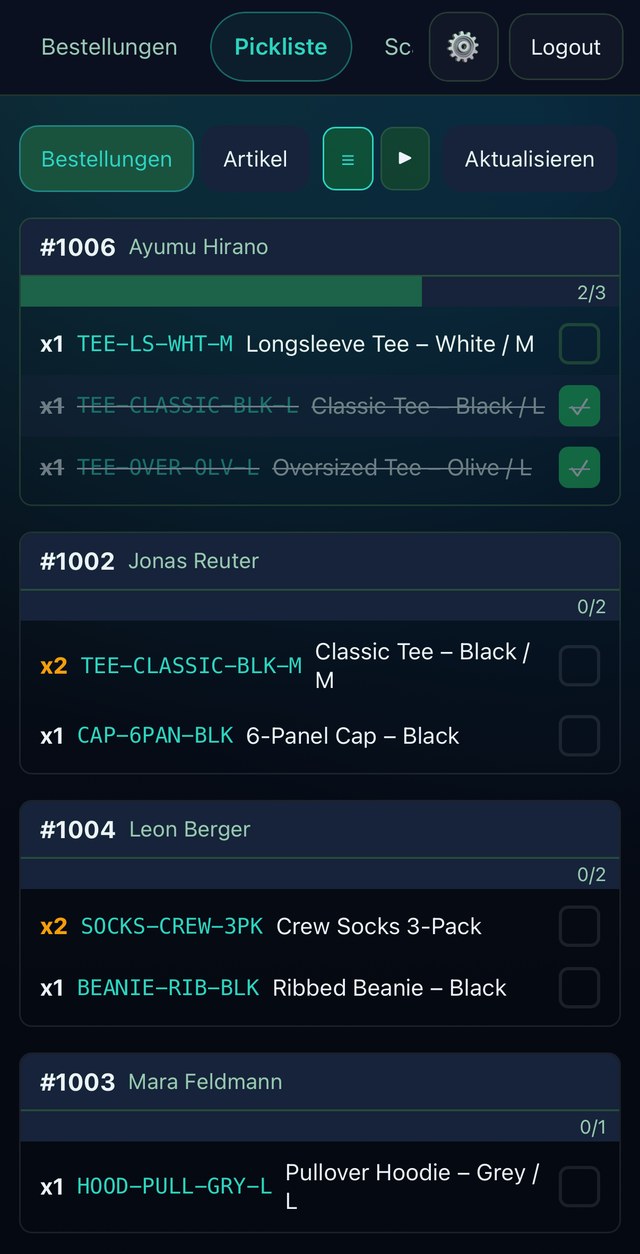
Scan instead of typePick without searchingEvery order under control

What you can rely on

Honest from the start

Stockaro is a young product in early access. Instead of invented success stories, here is what you can already rely on today.

Built in Germany

Stockaro is built and supported in Germany — short paths and a direct line to the team.

DPA on request

A data processing agreement under Art. 28 GDPR for every merchant — available on request.

Move across by CSV

Bring stock over from spreadsheets or a legacy system by CSV — standard columns (SKU, stock, minimum stock, supplier) are recognized automatically.

Early access, stated plainly

We say openly where Stockaro stands. Cancel monthly — and the feature set keeps growing visibly.

What Stockaro is not (yet)
No demand forecasting

Dedicated planning apps do real demand forecasts better — we deliberately leave that to them.

No store-to-store transfers

Multi-location transfers are on the roadmap but are not the core today.

Not an ERP

Accounting, payroll, CRM — that is not what Stockaro is for. A lean warehouse tool, not a monolith.

Pricing

Clear, simple pricing

Every core feature from the entry plan on — the plans scale with your order volume, not with locked features. No hidden costs, cancel any time.

Early access: the first 20 stores

Until regular billing starts we are running our beta: try it for free, with a personal 1:1 onboarding call (30–45 min). Take part actively and you then start with 3 free months and keep today’s price permanently. Limited to 20 stores.

Book a demo →
Basic
€12/month

Every core feature — for small stores with modest volume.

Up to 200 active SKUs
Up to 500 orders/month
Order release, packing workflow & packing slips
Suppliers, purchasing & receiving
Stocktakes & label printing
Scanning, automatic posting & statistics
Most popular plan
Standard
€29/month

The same feature set, more capacity for growing stores.

Up to 500 active SKUs
Up to 2,000 orders/month
Everything in Basic — nothing locked
More headroom for rising order volume
Pro
€79/month

More volume plus deeper reporting and automation.

Up to 3,000 active SKUs
Up to 5,000 orders/month
Everything in Standard
Advanced statistics (stock history & turnover)
Reorder list with suggestions
Custom label editor
Business
€149/month

For large setups with high stock and order volume.

Up to 15,000 active SKUs
Up to 10,000 orders/month
Everything in Pro
Priority support

Real warehouse work — receiving, scan picking, stocktakes — usually comes either as an ERP from around €100 a month or not at all; what is left are apps that only count stock. Stockaro sits in between: proper warehouse processes, from €12 a month.

All plans can be cancelled monthly. Stop any time, no notice period.

FAQ

Common questions

Early access

More order in the warehouse.
Less work.

Start free and migrate your stock in under 48 hours. No risk, cancel monthly.

Book a demo →