New: Stockaro is now on the Shopify App Store. Try the beta →
Shopify is retiring its inventory app Stocky on August 31, 2026 . It was removed from the App Store in early February 2026 — uninstall it and you cannot install it again. Shopify is not building a direct successor. Historical data does not carry over automatically, and supplier data cannot be exported at all, according to Shopify. After the shutdown there is read-only access for at least 90 days, and no more. Here is what to do now.
What exactly is happening
The facts about the Stocky shutdown
Shopify is not building a direct replacement: transfers, stock adjustments and simple counting have moved into the Shopify admin and POS; forecasting, reorder logic and mature receiving and stocktake workflows are referred to third-party apps. Shopify’s official transition page →
Export now
What to save before it is gone
The most critical part of the whole topic — which is why it comes first. Every point here is confirmed by Shopify’s official transition page.
Use Stocky’s built-in reports — Shopify explicitly recommends this for tax and audit records. Nothing carries over into a successor system automatically; the CSV export is your bridge.
The most critical point — verbatim from the Shopify Help Center: "Suppliers can’t be exported from Stocky." Contacts, terms, lead times and minimum order quantities have to be typed out or captured as screenshots. There is no other route.
For year-end accounts and your accountant — explicitly on Shopify’s official export list.
If you work with average or landed costs, save the current figures per SKU. Native Shopify receiving updates quantities only, not purchase prices.
Shopify recommends raising no new POs in Stocky from roughly 14 days before August 31, and receiving and closing everything still open beforehand. Half-migrated transactions are the most common source of errors.
Which kind of Stocky user are you?
There is no single "Stocky alternative"
Stocky did three very different jobs. The question is which of them you actually used — that determines what you need next.
Forecasting & reordering
Did you mainly use Stocky for demand forecasts, reorder suggestions and budgets? Then you need a planning app — Prediko, Inventory Planner, Sumtracker or Cogsy, for example. They answer "what and how much to order?" but do not touch the physical warehouse.
Receiving, scanning, stocktakes, warehouse work
StockaroDid you use Stocky for receiving, labels, stocktakes and the physical warehouse? Then you need a warehouse/scanning app (a light WMS): post goods in, scan barcodes, pick and pack, adjust stock, print labels. That is exactly what Stockaro is built for.
Store-to-store transfers
Shopify has upgraded transfers in POS (send and receive on the device, scanning, status). If that covers you, you need no extra tool. If you need transfer suggestions based on sell-through or min/max per location, the native path will disappoint — this is where the market is thinnest right now.
Honestly, all of it
Then two routes remain: combine two specialized apps (planning plus warehouse — this works well, because they are genuinely different jobs), or move towards an ERP. The latter is considerably more expensive and more work — exactly the overhead Stocky spared many people.
Timeline
Migrate with a buffer, not in a panic
- Ask your team: which Stocky features do you genuinely use every week?
- Run every export on the checklist — today, not in August.
- Test 2–3 candidate apps with one product group (no big bang).
- Connect the new app to the full catalog and reconcile stock.
- Create suppliers and open purchase orders in the new system.
- One week in parallel, then a cut-over date. Before August 31: one last check export.
- First stocktake in the new system — it exposes transfer errors.
- Document the processes (receiving, counting, reordering).
Where Stockaro fits
And where it does not (yet)
This guide is written by us, the people behind Stockaro — Shopify merchants ourselves, who built the app for our own warehouse first. Stockaro is made for type 2 : stock management with clean posting logic and automatic Shopify reconciliation (including drift detection), receiving and purchase orders, picking and packing by barcode scan straight from a phone — no special hardware. Plus label and packing slip printing, and reorder suggestions on the larger plans. Fully bilingual in English and German, built in Germany, hosted in the EU, from €12 a month.
Store-to-store transfers and multi-location logic (type 3) are on the roadmap but are not the core today. Pure demand forecasting (type 1) we deliberately do not build — the planning apps do it better. If those are your main topics, we would rather say so upfront than pull you into a trial.
Until regular billing starts we are running our beta: try it for free with a personal 1:1 onboarding call (30–45 min). Take part actively and you then start with 3 free months and keep today’s price permanently. Limited to 20 stores, so that we can accompany every move personally.
Warehouse reality
Sound familiar?
As order volume grows, spreadsheets and manual routines start to break down. Stockaro tidies up those processes.
Stockaro solves exactly these problems — no lengthy setup, no IT project, no weeks of training.
How it works
The whole flow in under a minute
From unclear stock levels to a picked and packed order — in the Shopify admin and out in the warehouse on a phone or tablet.
With sound · 54 seconds · plays without a consent prompt, the video is hosted on our own server
What's said in the video
Does your warehouse look like this too? Your Shopify store runs. Your warehouse doesn't.
The orders come in — but the computer is two rooms away. And the stock in your store hasn't been right for a long time.
Stockaro — in the Shopify admin. And in the warehouse, on a phone or tablet. In the admin you see everything: what's open, what's running low, what ships today.
Scan, book, done. Your Shopify stock follows right away. The list keeps up while you walk through the warehouse.
Stockaro. Warehouse management you can actually use in the warehouse.
Feature overview
Everything a Shopify warehouse needs
No oversized software, no overengineering. Stockaro covers the core processes of small and mid-sized Shopify stores — from putaway to reporting.
Every core feature from the entry plan on. Higher plans scale with your order volume, not with locked features. Only the items marked Pro and up are reserved for Pro and Business.
Stock & locations
- Item master with SKU, unit & barcode
- Complete movement journal — every change traceable
- Multiple bin locations & transfers
- Location hierarchy (aisle / rack / bin)
- Bundles & bills of materials
Receiving & purchasing
- Suppliers with price, lead time & minimum order
- Purchase orders with PDF & status
- Receive by scan — against open POs or freely
- Reorder suggestions Pro and up
Picking & fulfillment
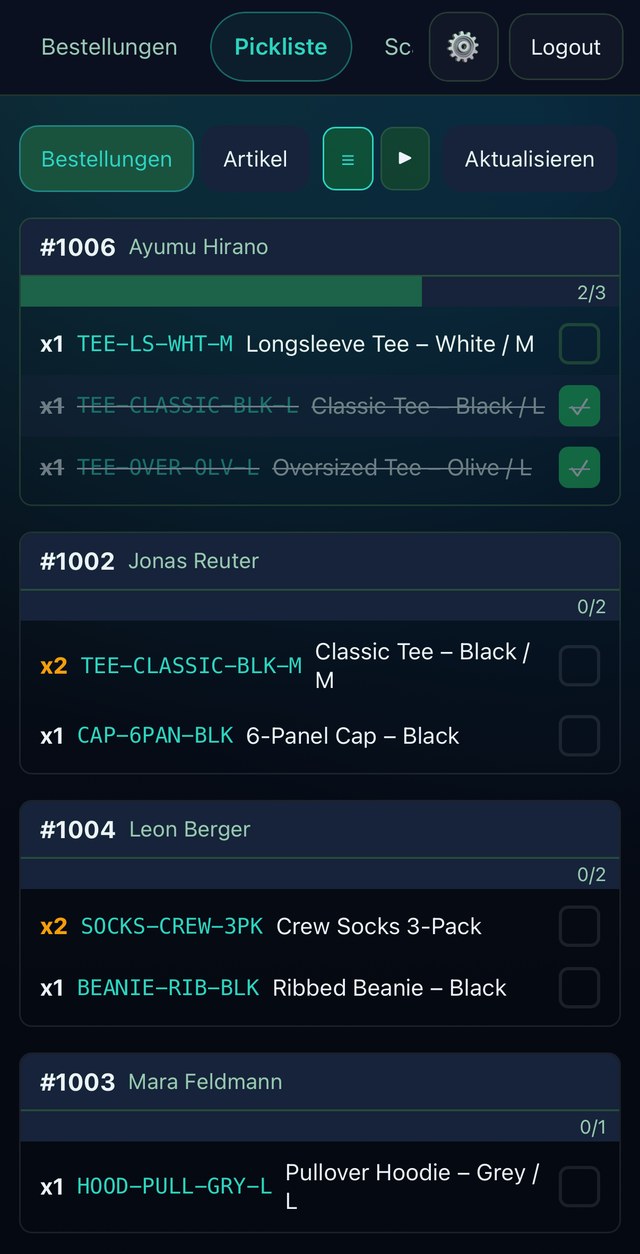
- Pick list by order or by item
- Scan picking, sorted by location
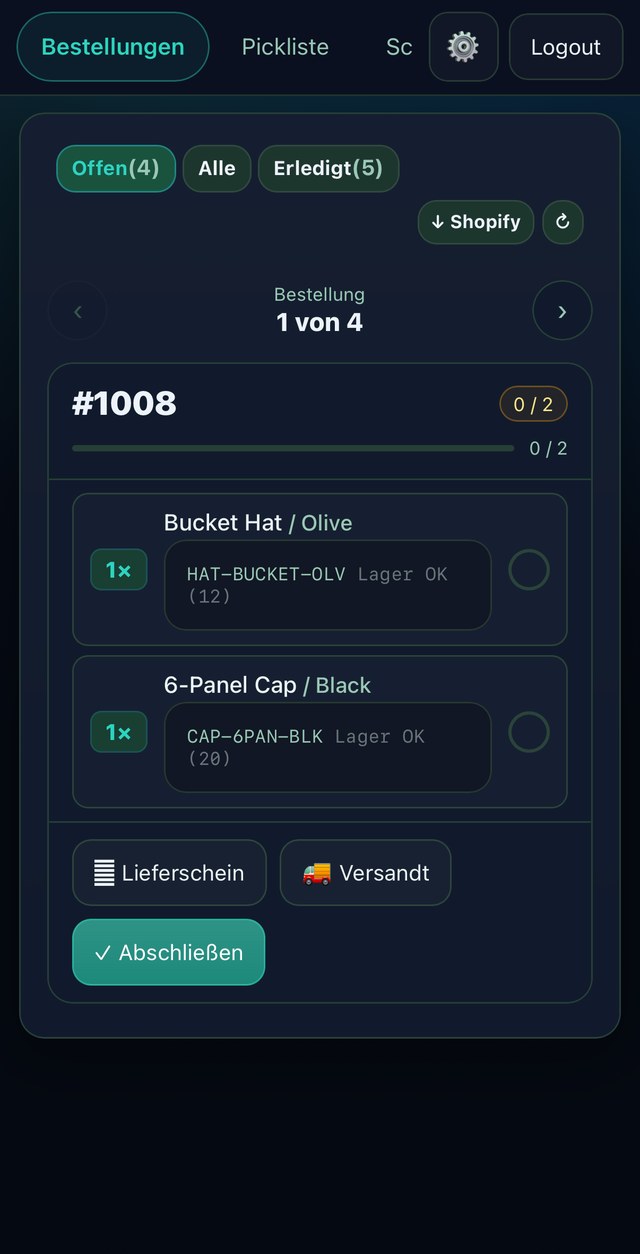
- Packing workflow & packing slip PDF
- Fulfillment with tracking number back to Shopify
Stocktakes
- Guided cycle counts
- Quick count straight from your phone
- Expected vs. counted, posted automatically
Labels & barcodes
- Label printing in 4 designs, single & batch
- Custom templates & Avery sheets Pro and up
- Scan with a phone camera or a hardware scanner
Shopify sync & control
- Stock posted automatically from paid orders
- Returns are posted back in
- Product approval for new variants
- Stock reconciliation with drift detection
Reporting
- Movement statistics & top SKUs
- Stock history & inventory turnover Pro and up
- Weekly report by email
Moving off Stocky? Shopify is retiring it on August 31, 2026 — you can bring your existing items across to Stockaro by CSV.
Migration
Three steps to an orderly warehouse
Stockaro is quick to set up — whether you have been working with spreadsheets, another tool, or no system at all.
Features
What Stockaro does day to day
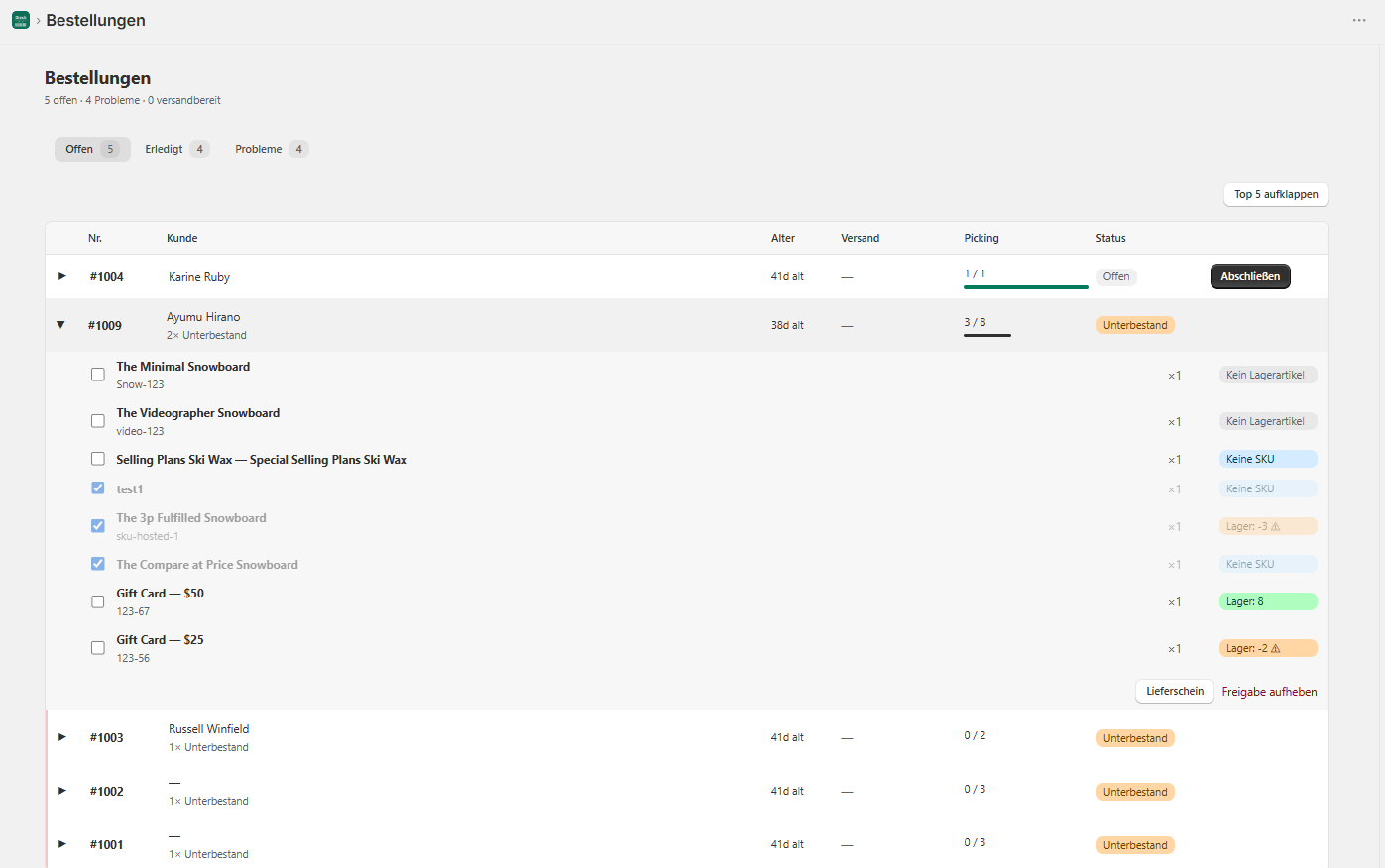
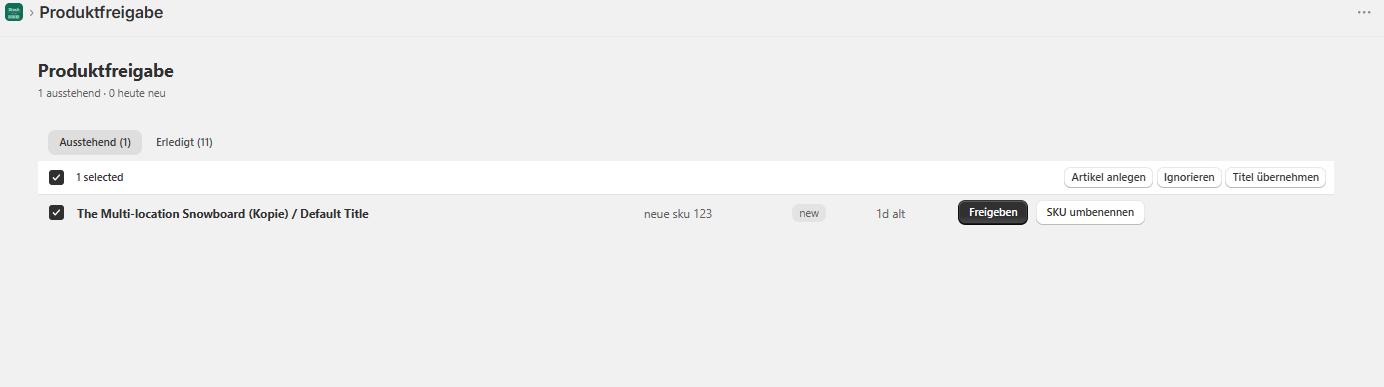
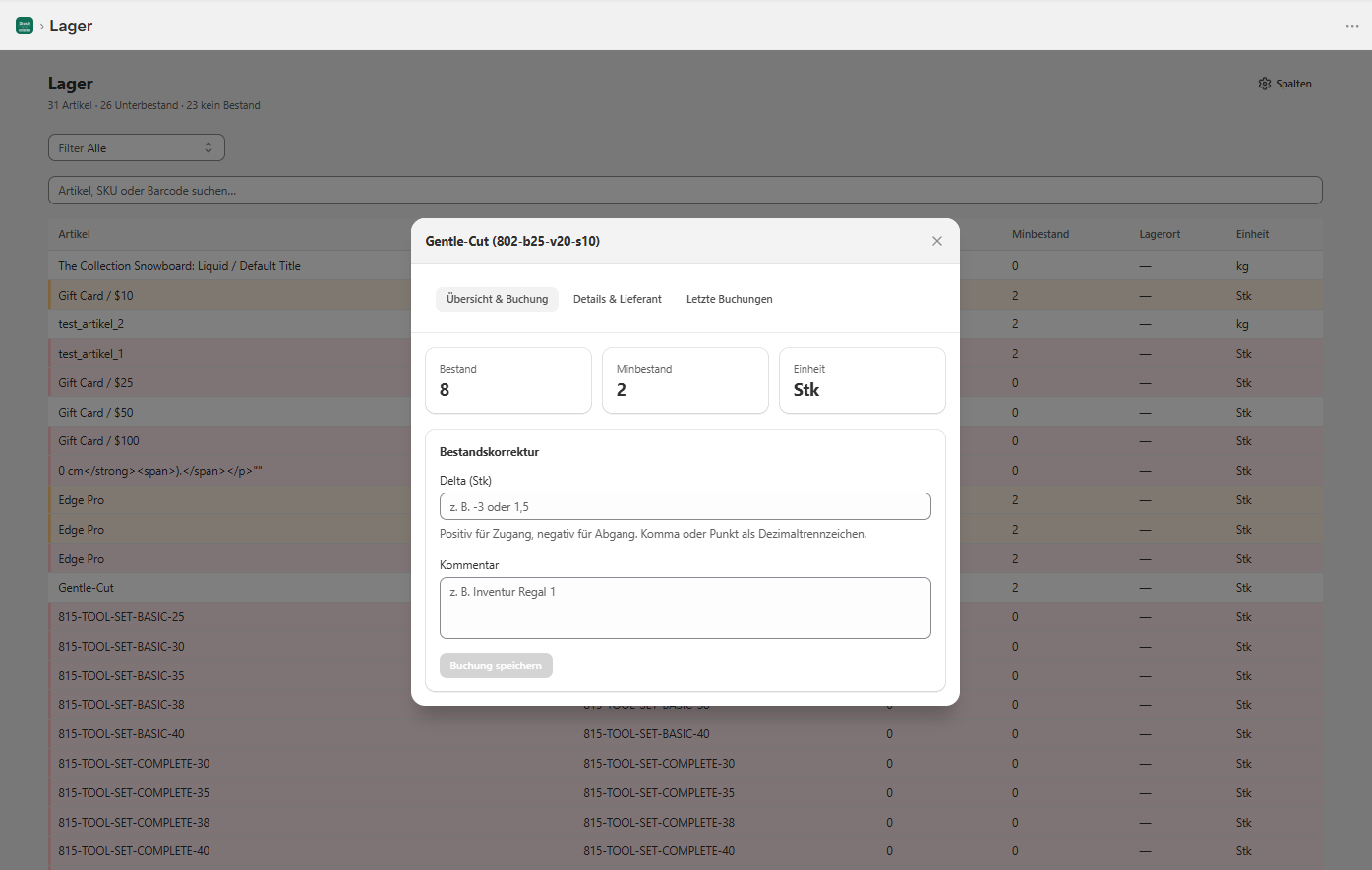
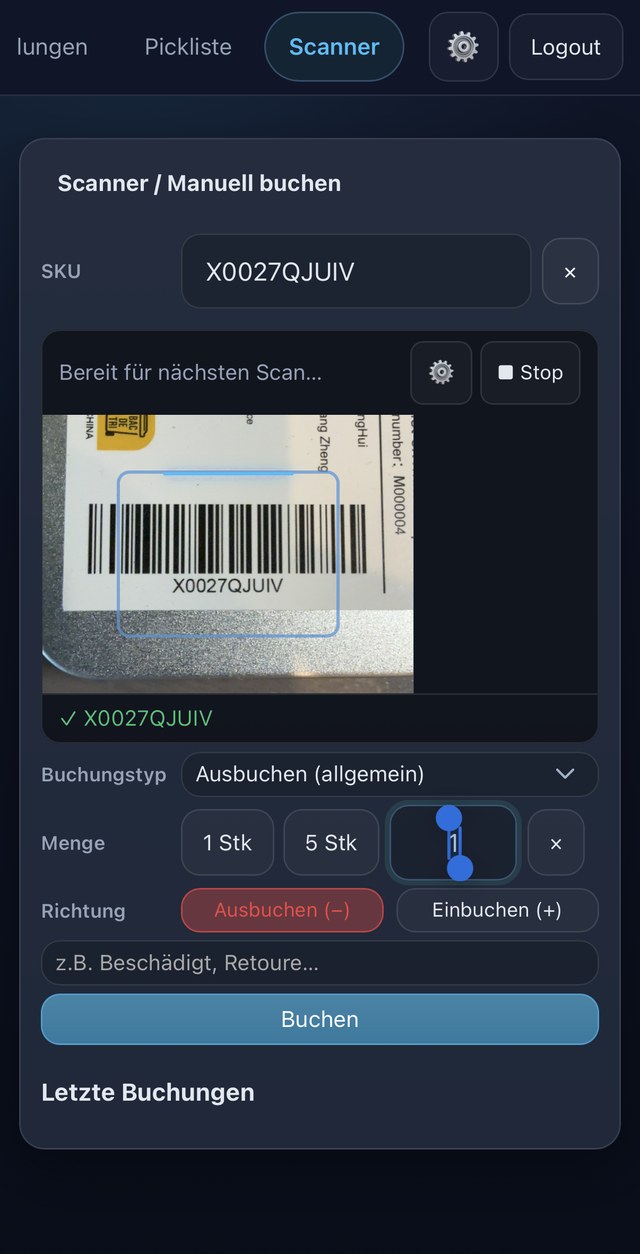
Mobile app
Scan at the rack,
steer from the desk
Stockaro runs entirely in the browser — on a phone and on a desktop. No app store, no installation, no update cycles.
Mobile · step 01
Scan instead of type
Your phone camera becomes the barcode scanner — SKU recognized, quantity chosen, stock posted in or out. No retyping into spreadsheets.
Mobile · step 02
Pick without searching
Open orders as one collected list — sorted by order or by item, ticked off line by line at the rack.
Mobile · step 03
Every order under control
Packing slip and fulfillment straight from the phone — live packing status per order, always the same stock as on the desktop.
What you can rely on
Honest from the start
Stockaro is a young product in early access. Instead of invented success stories, here is what you can already rely on today.
Stockaro is built and supported in Germany — short paths and a direct line to the team.
A data processing agreement under Art. 28 GDPR for every merchant — available on request.
Bring stock over from Stocky or from spreadsheets by CSV — standard columns (SKU, stock, minimum stock, supplier) are recognized automatically.
We say openly where Stockaro stands. Cancel monthly — and the feature set keeps growing visibly.
Pricing
Clear, simple pricing
Every core feature from the entry plan on — the plans scale with your order volume, not with locked features. No hidden costs, cancel any time.
Every core feature — for small stores with modest volume.
The same feature set, more capacity for growing stores.
More volume plus deeper reporting and automation.
For large setups with high stock and order volume.
Real warehouse work — receiving, scan picking, stocktakes — usually comes either as an ERP from around €100 a month or not at all; what is left are apps that only count stock. Stockaro sits in between: proper warehouse processes, from €12 a month.
All plans can be cancelled monthly. Stop any time, no notice period.
FAQ
Common questions
More order in the warehouse.
Less work.
Start free and migrate your stock in under 48 hours. No risk, cancel monthly.